


Being aware and proactive is crucial in executing project safety management. The field of safety monitoring has evolved due to technological advancements, offering innovative ways to optimize procedures and ensure everyone’s safety.
The integration of WSH PEER is one such solution that provides a comprehensive platform to enhance safety practices in projects. This platform enhances effectiveness and simplicity by integrating Telegram notifications, allowing stakeholders to receive real-time information. Let’s explore the features and benefits of this integration in more detail.
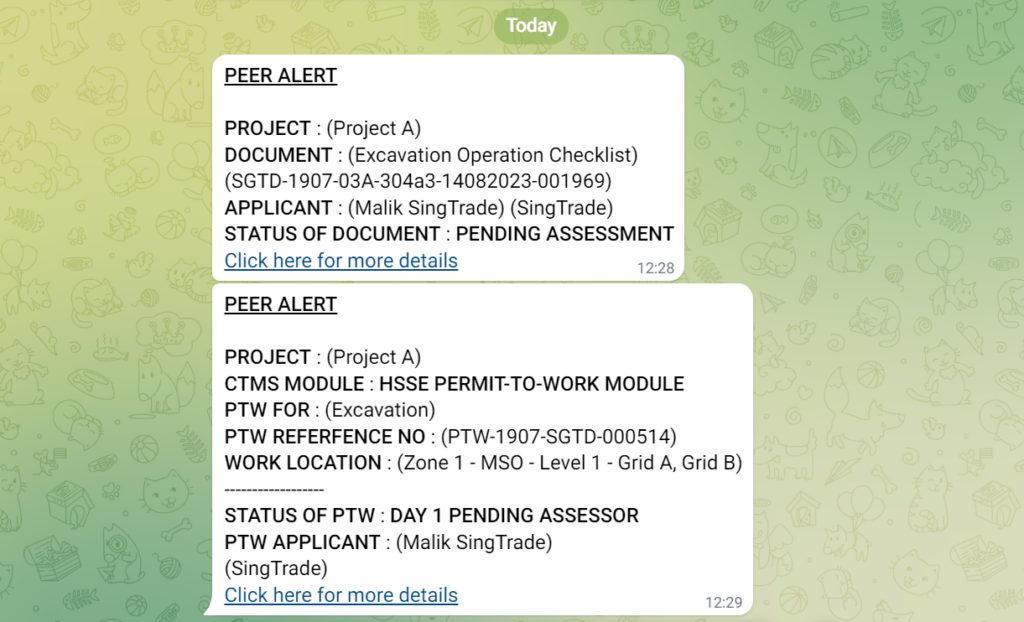
Project Safety Monitoring
The main goal of WSH PEER notifications is to promptly inform stakeholders of updates regarding project safety management. This feature enables users to receive alerts on their devices about safety procedures, inspections, maintenance, and other important information. This instant communication ensures that all parties involved are informed, facilitating prompt action for workplace safety and health.
Other Concerned Parties
PEER provides a user-friendly interface for individuals who require project-related notifications but do not possess WSH PEER accounts. These contacts can receive notifications via email. Additionally, the system simplifies contact management. Administrators can easily add, modify, or delete contacts as necessary, ensuring effective communication channels.
On Leave Notification
The absence of team members does not mean that effective safety management ends. Users can set on leave schedule by going into PEER accounts. This feature makes sure that stakeholders are aware of team members’ availability and can adjust responsibilities accordingly.
Users may also modify Telegram notifications to indicate their status for being on leave. Through the setting up of customized notification preferences, users can guarantee that they get only the most essential updates while they are not present, thereby facilitating continuous safety management.
Setting up Notifications
Configuring WSH PEER Telegram notifications is a simple procedure that enhances user convenience. The platform enables users to customize their notification preferences easily, adjusting the frequency and content of notifications to their preferred levels.
Users can tailor their notification settings based on their roles and responsibilities in the project, whether they wish to receive E-PTW alerts, inspections, and other safety reminders.
In conclusion, the integration of WSH PEER Telegram notifications has significantly improved project safety management. By providing immediate feedback and customizable alerts, stakeholders can enhance safety protocols, mitigate potential hazards, and ensure the well-being of all parties involved.
